
|
Your Name – enter your name or nickname as you want it displayed |
|
|
Name of Business |
|
|
Primary area of practice |
please specify field of law here:
|
|
2nd area of practice: (optional) |
please specify field of law here:
|
|
3rd area of practice: |
please specify field of law here:
|
|
4th area of practice: |
please specify field of law here:
|
|
5th area of practice: |
please specify field of law here:
|
|
Location – where you practice law (fill in as many fields as you
would like) |
|
|
|
Note: your profile does not go live until
you contribute a form
|
|
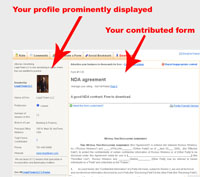
Click image below to see how we display your
profile
|
- Receive a free profile listing your firm's areas of expertise
- All contributed forms prominently display your business profile,
which include the optional fields of your phone number, email, and website address(see
example in top right)
- Connect with thousands of businesses, professionals, and potential
customers looking to use your expertise and services
- Your form will be highly optimized for the search engines, enabling people doing
keyword searches related to your business to find you via the profile we display
about you
- Feel good by giving back to the community by providing quality legal and business
forms for free
- You're protected: all users who download your forms agree to idemnify you Learn More
|
|
|
Your Name – enter your name or nickname as you want it displayed |
|
|
Name of Business |
|
|
2nd area of practice: (optional) |
please specify field of law here:
|
|
3rd area of practice: |
please specify field of law here:
|
|
4th area of practice: |
please specify field of law here:
|
|
5th area of practice: |
please specify field of law here:
|
|
Location – where you practice law (fill in as many fields as you
would like) |
|
|
|
Note: your profile does not go live until
you contribute a form
|
|
Click image below to see how we display your
profile
|
- Receive a free profile listing your firm's areas of expertise
- All contributed forms prominently display your business profile,
which include the optional fields of your phone number, email, and website address(see
example in top right)
- Connect with thousands of businesses, professionals, and potential
customers looking to use your expertise and services
- Your form will be highly optimized for the search engines, enabling people doing
keyword searches related to your business to find you via the profile we display
about you
- Feel good by giving back to the community by providing quality legal and business
forms for free
- You're protected: all users who download your forms agree to idemnify you Learn More
|
|
|
Your Name – enter your name or nickname as you want it displayed |
|
|
Name of Business |
|
|
2nd area of practice: (optional) |
please specify field of law here:
|
|
3rd area of practice: |
please specify field of law here:
|
|
4th area of practice: |
please specify field of law here:
|
|
5th area of practice: |
please specify field of law here:
|
|
Location – where you practice law (fill in as many fields as you
would like) |
|
|
|
Note: your profile does not go live until
you contribute a form
|
|
Click image below to see how we display your
profile
|
- Receive a free profile listing your firm's areas of expertise
- All contributed forms prominently display your business profile,
which include the optional fields of your phone number, email, and website address(see
example in top right)
- Connect with thousands of businesses, professionals, and potential
customers looking to use your expertise and services
- Your form will be highly optimized for the search engines, enabling people doing
keyword searches related to your business to find you via the profile we display
about you
- Feel good by giving back to the community by providing quality legal and business
forms for free
- You're protected: all users who download your forms agree to idemnify you Learn More
|
|

|
Our Spam Policy
We hate getting spam as much as you do. So we have implemented a tough spam policy
regading how we deal with your email. We pledge that we will:
- Never rent, trade, or sell any email or any personal information to any third
party without your explicit consent
Terms Of Use
Submissions to this site, including any legal or business forms, posts, responses
to questions or other communications by contributors are not intended as and should
not be construed as legal advice. You are strongly encouraged to consult competent
legal council before engaging in any action based upon content contained on this
site.
These downloadable forms are only for personal use. Retransmission, redistribution,
or any other commercial use is prohibited. This includes reposting forms from this
site to another site offering free legal or other document forms for download.
Please note that the donator may have included different usage terms regarding this
form, and you agree to abide by these terms. It is highly recommended that you have
a licensed attorney review any legal documents for which you are searching in order
to make sure that your needs are being properly and completely satisfied.
Your use of this site constitutes your acceptance of our terms of use and your agreement
to hold this site, its officers, employees and any contributors to this site harmless
for any damage you might incur from your use of any submissions contained on this
site. If you do not agree to the above terms, please do not proceed.
These forms are provided to assist business owners and others in understanding important
points to consider in different transactions. They are offered with the understanding
that no legal advice, accounting, or other professional service is being offered
by these documents or on this website. Laws vary in the different states. Agreements
acceptable in one state may not be enforced the same way under the laws of another
state. Also, agreements should relate specifically to the particular facts of each
situation. Therefore, it is important to consult legal counsel whenever utilizing
these forms. The Forms are not a substitute for legal advice YourFreeLegalForms.com
is not engaged in recommending or referring members on the site or making claims
about the competence, character or qualifications of its participating members.
Close
Thank you for using
Yourfreelegalforms.com
Your online source for 100% free legal and business forms.
Have a form to contribute?
Contribute a legal or business form, checklist or article and have your profile
displayed on the same page as the form for free, powerfull, targeted marketing to
those searching for legal forms and advice.
Rate this form
(must be logged in)
|
|
Social Bookmark this Form


|
|
|
Advertise your business to thousands for free –
Contribute a form
|
|
Form #1614c:\documents and settings\miqbal4\desktop\validation plan
|
Average user rating: |
Not Yet Rated
|
Rate it |
|
VALIDATION PLAN
VERSION: 00.00
ROLE
NAME AND TITLE
DATE
SIGNATURE
AUTHOR:
[AS PER THE DELIVERABLES SECTION OF THIS PLAN]
REVIEW AND APPROVAL:
[AS PER THE DELIVERABLES SECTION OF THIS PLAN]
[AS PER THE DELIVERABLES SECTION OF THIS PLAN]
[AS PER THE DELIVERABLES SECTION OF THIS PLAN]
[AS PER THE DELIVERABLES SECTION OF THIS PLAN]
Table of Contents 1 Purpose 3 2 Scope 3 3 Definitions 3 4 References 3 5 System Overview 4 6 Validation Assessment and S
|
 Need this form customized?
 |
 Download This Form
|
Printer Friendly Version
Terms Of Use
Submissions to this site, including any legal or business forms, posts, responses
to questions or other communications by contributors are not intended as and should
not be construed as legal advice. You are strongly encouraged to consult competent
legal council before engaging in any action based upon content contained on this
site.
These downloadable forms are only for personal use. Retransmission, redistribution,
or any other commercial use is prohibited. This includes reposting forms from this
site to another site offering free legal or other document forms for download.
Please note that the donator may have included different usage terms regarding this
form, and you agree to abide by these terms. It is highly recommended that you have
a licensed attorney review any legal documents for which you are searching in order
to make sure that your needs are being properly and completely satisfied.
Your use of this site constitutes your acceptance of our terms of use and your
agreement to hold this site, its officers, employees and any contributors to this
site harmless for any damage you might incur from your use of any submissions contained
on this site. If you do not agree to the above terms, please do not proceed.
These forms are provided to assist business owners and others in understanding important
points to consider in different transactions. They are offered with the understanding
that no legal advice, accounting, or other professional service is being offered
by these documents or on this website. Laws vary in the different states. Agreements
acceptable in one state may not be enforced the same way under the laws of another
state. Also, agreements should relate specifically to the particular facts of each
situation. Therefore, it is important to consult legal counsel whenever utilizing
these forms. The Forms are not a substitute for legal advice. YourFreeLegalForms.com
is not engaged in recommending or referring members on the site or making claims
about the competence, character or qualifications of its participating members.
|
|

|
|
<Organization>
|
|
<Project Name>
Validation Plan
|
|
VERSION: 00.00
|
|
Role
|
Name
and title
|
Date
|
Signature
|
|
Author:
|
|
[as per the Deliverables section of this Plan]
|
|
|
|
|
Review
and approval:
|
|
[as per the Deliverables section of this Plan]
|
|
|
|
|
[as per the Deliverables section of this Plan]
|
|
|
|
|
[as per the Deliverables section of this Plan]
|
|
|
|
|
[as per the Deliverables section of this Plan]
|
|
|
|
Table of Contents
1 Purpose. 3
2 Scope. 3
3 Definitions. 3
4 References. 3
5 System Overview.. 4
6 Validation Assessment and Strategy. 4
7 Risk Assessment 4
8 Service Provider Assessment 5
9 Validation Roles and Responsibilities. 5
10 Validation Deliverables. 5
10.1 Functional Work Type. 6
10.2 Technical Work Type. 8
10.3 Verify & Deploy Work
Type. 11
11 Acceptance Criteria. 12
12 Deviation Reporting. 13
13 Defect Reporting. 13
14 Application Configuration Control Process. 13
15 Procedures to be Developed/Modified. 14
16 Contingency Plan. 14
17 Revision History. 14
1
The purpose of this document is to describe the approach
that will be taken to ensure that the <Project Name> is developed
according to quality software engineering principles, that it provides the
functional capability required by the users and the system will continue to
provide the required functionality over time.
<In this section, describe the scope of the validation
effort. Information may include:
· What is being
validated – the whole system, a piece of the system, etc.?
· What is the release
number?
· Is this project an
extension, an upgrade, or a new system?
· Are there interfaces
to other systems?
· At what locations
will the system be used?
Also discuss any impact on the validation effort
or the focus of the validation effort based on the results of the Validation Analysis
and Risk Assessment.
A description out-of-scope items can be added if
deemed appropriate.>
See the SDLC Glossary, GDL-G-ALL-APM-176, for general
definitions.
<List any
definitions/acronyms/abbreviations, specific to this project, used in this
document that may not be familiar to reviewers and approvers of this
document.>
<List the approved and controlled documents
that are being referred in this document with their unique document
identifier.>
<Provide a brief overview of
the system by describing its functionality, location and intended use or
purpose. Provide a brief description of the system and process being developed /
evaluated.
For new systems, include statements, which
indicate that the system is a new installation, and identify the system
boundaries.
For legacy systems, provide high-level
information on the background of the system, when it was developed, previous
validation, and validation measures existing documentation, etc., as
applicable.
Describe the system environments that need to be
established and in place (e.g., Development, QA/Test, Production, Disaster
Recovery, etc.).>
As per the Validation Analysis, the following regulations
are applicable for this project and validation deliverables are required:
<Delete regulations that are not applicable.>
· Financial
Regulation: (SOx, etc.)-Any system/project - financial reporting or control,
purchasing and tracking assets (inventory, payroll, budgeting, etc).
· Legal
or Risk Management: Trademark, copyright, audit, change management, records
management
· Privacy:
Personally identifiable information, HIPAA, etc.
· Product
Regulation: (FDA, etc.)-Any system/project relating to product - purchase,
manufacture, distribution, recall or control.
· Security:
IAPP Information Asset Protection) - system or project containing business
critical information
· WICO
· Others
… <please define>
<If
none of the above applies, use the following statement and delete the text above.>
As per the Validation Analysis, the project is not subject
to regulation and validation deliverables are not required.
<Describe the validation strategy to be
followed for the project. Identify the type of Implementation (Custom or SAP)
and the work type(s) that apply for the project. Include an overview of the
environment(s) that will be used (e.g. a validation environment will be used
for testing prior to Production deployment). Specify if the use of this system does/does not fall under the scope of
validation.>
<An initial risk assessment is performed to
evaluate risk factors involved in computerizing a manual process, or in the
purchase or enhancement of a computerized system. This assessment covers risks
to the business, to regulatory validation patient safety, and other areas of validation
. The GxP criticality of the system, and whether it is GxP regulated or not,
should be documented.
In this section, define the strategy for
addressing business and validation risks and describe the plans and processes
for tracking risks. Each plan should:
· Identify
and prioritize risk areas.
· Identify
factors contributing to the potential occurrence of each risk.
· Describe
the means to reduce each risk or rationale for accepting the risk.
· Identify
contingency procedures for each risk area.
The assessment may be used to tailor the
validation process, ensuring the appropriate life cycle work types are being
executed, documentation, and level of testing. This risk assessment should be
documented. This assessment will be revisited and enhanced later in the life
cycle as necessary.
The risk assessment described above focuses on
residual risks, such as validation and business risks associated with the
system in operation. Project risks, such as risks to the completion of the
project, availability of resource, and technical feasibility, will be covered
in the Project Risk Register. Additionally, those areas of non-validation to
the IAPP, if they exist, should be documented as validation risks. Other
technical risks may be associated with potential safety/reliability hazards
identified during the hazard analysis and reliability activities of the
proposed system. These safety and effectiveness risks need to be documented in
the risk assessment documentation.>
<Internal suppliers (service provider) should
comply with relevant local and corporate computerized system validation
requirements.
Each external supplier should be formally
assessed to determine their suitability and their ability to support the user’s
computerized system validation and validation requirements. This assessment
should be conducted and documented, and in many cases this will involve an
audit of the supplier. This assessment should be performed prior to signing any
contract with the supplier. In addition, a Business Partner Risk Assessment
(BPRA) must be conducted if need is identified in the Validation Analysis. If
another J&J Company has already audited the supplier at the same location
for the same reason, then subject to that company agreeing to share such
information, another audit may not be required. The justification for not
auditing a specific supplier should be formally documented.>
This section identifies the validation roles and
responsibilities for <Project Name>. Associates may fulfill
multiple roles provided independence of review/approval is maintained (i.e.,
individuals may not review/approve their own work). Some associates changes may
occur during execution of the project.
<Identify the roles and responsibilities of
the parties involved in the validation process.>
<Guidance
on approval roles is available in the Roles Matrix, GDL-G-ALL-APM-157. Identify
the validation documents required
for the system and assign the roles as the responsible Owner to the
deliverable. Provide a rationale in the Comments column for items that will NOT
be included. Additional rows may need to be added to the applicable tables
below to ensure system environments are covered (e.g., hardware and software for
both test and production environments).
Documents
may need to be revised and re-approved, as necessary, as the team progresses
through the Process. These will be reviewed and revised as necessary, prior to
closing the work type. Any deviations from this plan must be described in the
comments section (i.e. Functional Specification has been combined in the User
Requirements Specification). Modify the default values in the Approver Roles
and Comments fields as appropriate.>
This section identifies the validation deliverables for the
project. NOTE: The lists of deliverables in the following tables include the
deliverables for both the Custom and the SAP
Implementations in the SDLC. The deliverables marked with
(*) do not have an SDLC template. Please use
templates, system, or documentation format per local or corporate standards or
guidelines, as appropriate.
The following key is used in the deliverables tables:
· A: If Applicable. Mandatory if
the deliverable is applicable.
· M: Mandatory. Create the
deliverable OR write a rationale in the Validation Plan as to why it is not
necessary for the specific project.
· N/A: Not applicable.
· R: Recommended. It is a project
decision, but the recommendation is to create the deliverable for the specific
project, following project development best practices.
· O: Optional. It is a project
decision, but there are no impacts at all if not applied.
GxP and SOx project recommendations take priority over ‘All
others except Simplified Path’ recommendation. For projects which are
classified as Simplified Path please use ‘Simplified Validation Plan and
Specification’ template in SDLC.
|
|
|
|
|
|
|
|
|
|
Validation
Analysis (Approved)
|
|
|
|
M
|
M
|
M
|
|
|
Validation
Plan (Approved)
|
|
|
|
M
|
M
|
M
|
|
|
User
Requirements Specification (Approved)
|
|
|
|
M
|
M
|
M
|
|
|
Business
Impact Assessment (Approved)
|
|
|
|
A
|
A
|
A
|
<Applicable if the
Business Continuity or DRP is in scope of the project>
|
|
Business Continuity
& Recovery Risk Acceptance Form (Approved)
|
|
|
|
A
|
A
|
A
|
<Applicable if the
Business Continuity or DRP is not in scope of the project>
|
|
Business
Process Analysis (Created)
|
|
|
N/A
|
R
|
R
|
R
|
|
|
Logical
Design (Approved)
|
|
|
|
M
|
M
|
M
|
|
|
Traceability
Matrix (In Progress)
|
|
|
|
M
|
M
|
M
|
|
|
Risk
Assessment (FMEA) (Approved)
|
|
|
|
M
|
M
|
R
|
|
|
Business
Partner Risk Assessment (BPRA) (Completed, if applicable)
|
|
|
N/A
|
R
|
R
|
R
|
|
|
Architecture
Design (Approved)
|
|
|
|
O
|
O
|
O
|
|
|
Functional
Specifications (Approved)
|
|
|
|
M
|
M
|
M
|
|
|
Functional
Specifications SAP (Approved)
|
|
|
|
M
|
M
|
M
|
|
|
Functional
Specifications - SAP Conversions (Approved)
|
|
|
|
M
|
M
|
M
|
|
|
Functional
Specifications - SAP Enhancements (Approved)
|
|
|
|
M
|
M
|
M
|
|
|
Functional
Specifications - SAP Interfaces (Approved)
|
|
|
|
M
|
M
|
M
|
|
|
Functional
Specifications - SAP Reports and Forms (Approved)
|
|
|
|
M
|
M
|
M
|
|
|
* IAPP Application Pre-Purchase Questionnaire (Approved)
|
|
|
|
M
|
M
|
M
|
<Always
applicable unless the Infrastructure CISO has concurred that no IAPPs validation
is required for the project in the validation analysis>
|
|
Functional
Infrastructure Specification (Approved)
|
|
|
|
M
|
M
|
R
|
|
|
Landscape
Design (Completed)
|
|
|
N/A
|
M
|
M
|
R
|
|
|
Database
Design (Approved)
|
|
|
|
O
|
O
|
O
|
|
|
Functional
Custom Exit Review Checklist (Approved)
|
|
|
|
M
|
M
|
M
|
|
|
Functional
SAP Exit Review Checklist (Approved)
|
|
|
|
M
|
M
|
M
|
|
|
|
|
|
|
|
|
|
|
|
Detailed
Design (Approved)
|
|
|
|
M
|
M
|
R
|
|
|
* IAPP Internally Deployed Application Questionnaire (Approved)
|
|
|
|
A
|
A
|
A
|
<Always applicable
unless the Infrastructure CISO has concurred that no IAPPs validation is
required for the project in the validation analysis>
|
|
* IAPP Physical Security of Information Assets Questionnaire (Approved)
|
|
|
|
A
|
A
|
A
|
<Mandatory if the
solution or servers are hosted outside of ITSS data centers in Raritan or
Beerse>
|
|
Infrastructure
Detailed Design (Approved)
|
|
|
|
M
|
M
|
M
|
|
|
Technical Design Specifications – SAP Reports (Approved)
|
|
|
|
M
|
M
|
M
|
|
|
Technical
Design Specifications – SAP Interfaces (Approved)
|
|
|
|
M
|
M
|
M
|
|
|
Technical
Design Specifications – SAP Conversions (Approved)
|
|
|
|
M
|
M
|
M
|
|
|
Technical
Design Specifications – SAP Enhancements (Approved)
|
|
|
|
M
|
M
|
M
|
|
|
Technical
Design Specifications – SAP Forms (Approved)
|
|
|
|
M
|
M
|
M
|
|
|
Traceability
Matrix (Completed)
|
|
|
See Traceability Matrix entry in
the Functional Work Type table
|
M
|
M
|
M
|
See Traceability Matrix entry in
the Functional Work Type table
|
|
Security
Configuration Standard, or equivalent (Approved)
|
|
|
|
M
|
M
|
M
|
|
|
Technical
Requirements (Approved)
|
|
|
|
R
|
R
|
R
|
|
|
Architecture
and Deployment (Approved)
|
|
|
|
M
|
M
|
M
|
|
|
Integration
Physical Design (Approved)
|
|
|
|
M
|
M
|
M
|
|
|
System
Test Protocol (Approved)
|
|
|
|
M
|
M
|
M
|
|
|
System
Test Script (Approved)
|
|
|
|
M
|
M
|
M
|
|
|
Qualification
Plan (Approved)
|
|
|
|
M
|
O
|
O
|
|
|
Production
Turnover Document of Understanding (Approved)
|
|
|
|
O
|
M
|
A
|
<Applicable
if specific Operations areas are not addressed by standard procedures>
|
|
Risk
Assessment (FMEA) (Approved)
|
|
|
See Risk Assessment (FMEA) entry
in the Functional Work Type table
|
M
|
M
|
R
|
See Risk Assessment (FMEA) entry
in the Functional Work Type table
|
|
Executed
Infrastructure Qualification Templates and Protocols (Approved)
|
|
|
|
M
|
M
|
M
|
|
|
Formal
Stakeholder Acceptance Notice (Approved)
|
|
|
|
O
|
M
|
M
|
|
|
Qualification
Summary Report (Approved)
|
|
|
|
M
|
O
|
O
|
|
|
Development
Test Checklist (Completed)
|
|
|
N/A
|
R
|
R
|
R
|
|
|
Authorization Profiles Design (Approved)
|
|
|
|
M
|
M
|
M
|
|
|
Authorizations
Master Data (Completed)
|
|
|
|
M
|
M
|
M
|
|
|
* Source Code (Controlled) )
|
|
|
N/A
|
M
|
M
|
M
|
|
|
* Configuration File (Controlled)
|
|
|
N/A
|
M
|
M
|
M
|
|
|
* Executables (Controlled)
|
|
|
N/A
|
M
|
M
|
M
|
|
|
Data
Conversion/ Migration Protocol (Approved)
|
|
|
|
M
|
M
|
M
|
|
|
Data
Conversion/ Migration Report (Approved)
|
|
|
|
M
|
M
|
M
|
|
|
* Release Notes (Controlled)
|
|
|
N/A
|
O
|
O
|
O
|
|
|
* End User Materials (Reviewed)
|
|
|
N/A
|
O
|
O
|
O
|
|
|
Technical
Custom Exit Review Checklist (Approved)
|
|
|
|
M
|
M
|
M
|
|
|
Technical
SAP Exit Review Checklist (Approved)
|
|
|
|
M
|
M
|
M
|
|
|
|
|
|
|
|
|
|
|
|
* Standard Operating Procedures (Approved)
|
|
|
|
M
|
M
|
R
|
|
|
* Document Control Matrices (Approved)
|
|
|
|
O
|
M
|
R
|
|
|
* Training Records (Completed)
|
|
|
N/A
|
M
|
M
|
R
|
|
|
System
Test Report (Approved)
|
|
|
|
M
|
M
|
M
|
|
|
User
Acceptance Test Protocol (Approved)
|
|
|
|
M
|
M
|
M
|
|
|
User
Acceptance Test Script (Approved)
|
|
|
|
M
|
M
|
M
|
|
|
User
Acceptance Report (Approved)
|
|
|
|
M
|
M
|
M
|
|
|
Release
Schedule (Completed)
|
|
|
N/A
|
O
|
O
|
O
|
|
|
* End User Material (Final)
|
|
|
N/A
|
O
|
O
|
O
|
|
|
Test
Defect Log (Closed or In Progress)
|
|
|
N/A
|
M
|
M
|
M
|
|
|
Test
Defect Reports (Closed)
|
|
|
N/A
|
M
|
M
|
M
|
|
|
* CAPAs (Opened)
|
|
|
N/A
|
M
|
M
|
R
|
|
|
Traceability
Matrix (Approved)
|
|
|
See Traceability Matrix in the
Functional Work Type table
|
M
|
M
|
R
|
See Traceability Matrix entry in
the Functional Work Type table
|
|
Validation
Report (Approved)
|
|
|
|
M
|
M
|
M
|
|
|
Application
Knowledge Document (Approved)
|
|
|
|
O
|
O
|
O
|
|
|
* Dry Run Test Results (Completed)
|
|
|
N/A
|
R
|
R
|
R
|
|
|
* Go-live Plan (Approved)
|
|
|
|
R
|
R
|
R
|
|
|
* Release Authorized for Production Deployment
|
|
|
N/A
|
R
|
R
|
R
|
|
|
* System Release Announcement (Final)
|
|
|
N/A
|
M
|
M
|
R
|
|
|
Request
for Change (Approved)
|
|
|
|
M
|
M
|
M
|
|
|
Error
Handling Document (Approved)
|
|
|
|
R
|
R
|
R
|
|
|
* Compliant Application Deployed to Production
|
|
|
N/A
|
M
|
M
|
M
|
|
|
* Compliant SAP System in Production Environment
|
|
|
N/A
|
M
|
M
|
M
|
|
|
* Production System Released to Users
|
|
|
N/A
|
M
|
M
|
M
|
|
|
Release
Approval Form (Approved)
|
|
|
|
M
|
M
|
R
|
|
|
Service
Desk Frequently Asked Questions (Approved)
|
|
|
|
O
|
O
|
O
|
|
|
* Diagnostic Script (Completed)
|
|
|
N/A
|
O
|
O
|
O
|
|
|
Validation
Plan for Support (Approved)
|
|
|
|
M
|
M
|
M
|
|
|
Verify
& Deploy Custom Exit Review Checklist (Approved)
|
|
|
|
M
|
M
|
M
|
|
|
Verify
& Deploy SAP Exit Review Checklist (Approved)
|
|
|
|
M
|
M
|
M
|
|
The execution of this Validation Plan will be considered
successful and the system may be used in its production environment when:
· Development,
review, and approval of all validation deliverables is complete
· Execution
and documentation of all validation tasks is complete
· All Test
Defects must be addressed and CAPAs must be opened for any unresolved Test
Defects that are classified as High or Medium. Justification for releasing the
system to Production with open Test Defects classified as High or Medium must
be included in the Validation Report.
Any deviations from this Validation Plan will be documented
and rationalized in the Validation Report.
<Describe the process for reporting and
resolving defects from executing formal testing. Refer to Attachment A
& B of this Validation Plan to document the test defects report and log to
be used throughout the testing process. The data will be summarized in
the Validation Report. Default criteria for classifying test defects as
High, Medium, or Low are provided and can be modified as needed.>
Test Defects will be classified as High, Medium or Low based
on root cause as follows and the classification should be recorded on the Test
Defect Report Form:
|
Root Cause
|
Description
|
Test Defect
Classification
|
|
Documentation Error
|
The system
is operating as designed; the system documentation is in error.
|
Low
|
|
System Error
|
Major system issue where the system cannot be used
as intended. This could include data acquisition failures, data loss or
corruption, reported or calculated results showing a serious error, security
breaches, or audit trail problems.
|
High
|
|
|
A system command or function does not operate as
expected. No data is lost or corrupted, but the error could prevent acceptance
of the system.
|
Medium
|
|
|
A system
command or function does not operate as expected, but the error is not
essential to system operation, does not impair the intended use of the
system, does not compromise data integrity or
security, and should not prevent acceptance of the system.
|
Low
|
|
Test Script Error
|
The system
is operating as designed; the test script is in error.
|
Low
|
|
Tester Error
|
The system
is operating as designed; the tester caused the unexpected result to occur.
|
Low
|
<Describe the process for controlling and
maintaining the configuration of the application or system throughout the
project. Refer to relevant procedures, as applicable.>
<This section describes the activities
required to identify change, to control change, to ensure proper implementation
of changes, and to report changes while the system deliverables are under
control of the system developer(s), prior to user acceptance or completion and
approval of the User Acceptance Test cases.>
<List the procedures to be developed and/or
modified for operating the software system (e.g., security procedures,
operating procedures, etc.).>
<Describe the strategy if an event or issue
were to occur that would result in a decision to revert back to the original
state or old environment during the implementation process, resulting in a
postponement of the conversion or implementation to the new system. Identify
the approvals required to stop the implementation. Describe the communication
that would need to occur (e.g., method of communication, to whom, when,
etc.).>
<Use the table below to track changes made to
the document. Be sure to include the date the document was created/updated. Be
sure to sufficiently define changes to facilitate version review and document
update approvals.>
|
|
|
|
|
|
|
|
|
<Add project revision
history starting here>
|
<Instructions for Use
Guidance for creating documents or templates from
this template:
· Always
start with a fresh template. Do not use a locally stored template or existing
Document as a starting point.
· It
will be useful to display fields as shaded. Tools| Options, View Tab, select
Always in the field “Field Shading.” You will only need to do this once. This
is useful to include in you templates Instructions for Use.
· Using
File | Properties provide values for the fields defined. Provide values for all
the fields defined in the lower portion of the display. Then select the entire
document and press F9. This will populate the fields throughout the document
with the customized values. To convert field values to regular text, select and
type Ctrl-Shift F9.
· Use
fields in boilerplate text for items such as Project Name, Project ID, System
Name, etc.
· Provide
general instructions for use within your template; be sure to include
instructions to remove all the Template Instruction text. Also see above on
shading fields.
· Formatting
requirements for Templates
Ø Minimize section
breaks; they confuse people. Also some older printers have problems when
switching between landscape and portrait layouts.
Ø All tables have their
heading rows(s) set to repeat at the top of each page
Ø Use Paragraph spacing
(format | Paragraph) to put blank spacing between paragraphs. Do not use empty
paragraphs to provide the blank space as it makes orphan and widow control
impossible.
Ø Do not hardcode page
breaks unless the page break will occur in that spot on every instance of the
document (such as before Section 1). Use Format |Paragraph| Lines and Page
Breaks | Page Break Before when page-breaking before a heading, for example.
Ø Use Styles to change
fonts, spacing, etc. when possible. It makes it easier to change consistently
later.>
Our Spam Policy
We hate getting spam as much as you do. So we have implemented a tough spam policy
regading how we deal with your email. We pledge that we will:
- Never rent, trade, or sell any email or any personal information to any third
party without your explicit consent
Terms Of Use
Submissions to this site, including any legal or business forms, posts, responses
to questions or other communications by contributors are not intended as and should
not be construed as legal advice. You are strongly encouraged to consult competent
legal council before engaging in any action based upon content contained on this
site.
These downloadable forms are only for personal use. Retransmission, redistribution,
or any other commercial use is prohibited. This includes reposting forms from this
site to another site offering free legal or other document forms for download.
Please note that the donator may have included different usage terms regarding this
form, and you agree to abide by these terms. It is highly recommended that you have
a licensed attorney review any legal documents for which you are searching in order
to make sure that your needs are being properly and completely satisfied.
Your use of this site constitutes your acceptance of our terms of use and your agreement
to hold this site, its officers, employees and any contributors to this site harmless
for any damage you might incur from your use of any submissions contained on this
site. If you do not agree to the above terms, please do not proceed.
These forms are provided to assist business owners and others in understanding important
points to consider in different transactions. They are offered with the understanding
that no legal advice, accounting, or other professional service is being offered
by these documents or on this website. Laws vary in the different states. Agreements
acceptable in one state may not be enforced the same way under the laws of another
state. Also, agreements should relate specifically to the particular facts of each
situation. Therefore, it is important to consult legal counsel whenever utilizing
these forms. The Forms are not a substitute for legal advice YourFreeLegalForms.com
is not engaged in recommending or referring members on the site or making claims
about the competence, character or qualifications of its participating members.
Close
Thank you for using
Yourfreelegalforms.com
Your online source for 100% free legal and business forms.
Have a form to contribute?
Contribute a legal or business form, checklist or article and have your profile
displayed on the same page as the form for free, powerfull, targeted marketing to
those searching for legal forms and advice.
Rate this form
(must be logged in)
|
|
Social Bookmark this Form

|
|
Keywords: c:\documents and settings\miqbal4\desktop\validation plan
|
|
|